One of the greatest things about the modern internet is the emergence of "the Cloud." The movement towards Cloud Computing has been growing for some time, but - looking back now - it seems like it really made its emergence in 2008.
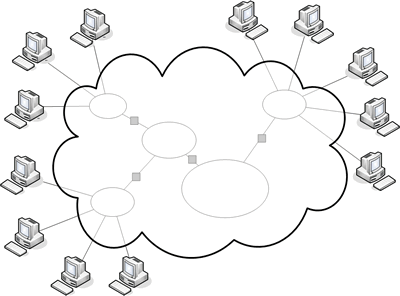 For those of you puzzling over what I'm talking about, "the Cloud" is really just the internet, so named because on network diagrams, connections to the internet are shown as a cloud. For some time the Internet has been used to serve information to each other. Email is one such application: a user at a terminal on the left side of the picture above shoots a chunk of information to a user on the right side of the image. Internet browsing is another. A user on the right side sends a request for information to a computer on the left hand side, and that computer returns a chunk of information that the right-hand computer can composite into a web page.
Typically, we install programs on our computers and use those programs to write a letter on Word, crunch numbers in Excel, watch a movie or listen to a song in Windows Media Player or iTunes, play games, etc. The program and the data reside on our hard drives and use our hardware; in some cases the application might go out to the Internet to grab some information, but all the processing was done locally. But in the last couple of years, the Internet has seen the steady growth of Web 2.0 applications, where the program no longer resides on our computer. Instead of making a request to a computer across the network for a static blob of information to be composited as a page, we are now able to make a request of a computer on the other side of the network and have that computer do something for us. The code and the processing power resides on the other side of the Cloud. This is great for software companies for a variety of reasons. Delivery is made a lot easier - no CDs to burn, manuals to be printed, blister packs to prepare, shipments to be made; no big box store is needed to do the actual distribution, idiot end users who may do funky things with their install won't be calling tech support.... It also means that the software company can make updates a lot easier and get them out a lot easier and keep everyone on the same set of code. In fact because you control the environment, you can ignore many of the problems of developing for multiple platforms. As long as they can access your server via the Internet through one of the handful of standardized browser's - your computers do the heavy lifting in whatever language you want; it's up to the client's browser to composite the standardized blob you send them back. And you don't have to worry about bootleggers copying disks and sending it to all of their friends, or their two laptops and desktop computer.
And not only is the program code on a server sitting across the internet, but the data for that program is also likely sitting "in the Cloud." The letter you typed, the numbers you crunched, the photos you uploaded and manipulated aren't on the computer you used, but are sitting on another computer linked to the computer providing the code. And that seems a little weird - your stuff, your information isn't on some medium that you own or control. It's on a computer many hundreds or thousands of miles from you, jumbled together with the data from a bunch of other people - but still, almost instantaneously available to you.
There are several implications to this arrangement. One, it can be a bit of a security problem. If you don't control your data, how can you protect it against being accessed by others, or used without your permission? Two, if you need access to the Internet in order to retrieve your data, what happens when you lose connection to the Internet, or the server the data is on loses connection to the Internet, or the company administering the server goes out of business?
In some ways, these problems aren't really all that different from problems that exist in the "real world" side of computing. If all of your data is on your laptop and you don't have access to your computer - you don't have access to your data. And what happens if you out and out lose your computer or get it stolen or the computer crashes? Unless you've back up regularly - and which of us is confident that our backup protocol is airtight? - the chances are you are going to lose something. And in terms of security, it is not a difficult thing to smash and grab a laptop and thus gain access to a whole bunch of personal information.
In some ways, Cloud computing is a little more secure and stable. The fail-safe abilities that these companies have is impressive; strong backup protocols, redundant servers, 24 hour maintenance. If their hard drive crashes, it's already been backed up and was probably replicated on another server anyways. You can't smash and grab these places - your data is generally split up and sent all over the place - so it's not in one easy location for a thief to access, and you need to have a password in order to get to the data. I mean, given enough desire and know-how, a thief can capture your password and gain access - but it takes a lot more effort to do that than to break your window, grab your computer, and run out of the house.
It's my belief, however, that the big benefit of Cloud computing far outweighs the potential problems, and that's access. It's a security risk (less of a problem and more of something that needs to be provided for), but because your data is distinct from your computer, you can get at it from many different places, computers, and platforms. At work? You can likely use work's internet connection to get to your data. At a friend's house - ask for a quick couple of minutes on their computer. On vacation - you wouldn't believe the number of internet cafes and business centers that are in major metropolitan areas. On the go - most cell phones these days can access the data just as easily.
A case in point of one of the most popular Web 2.0, cloud-based applications: GMail. Google controls GMail's code base, and they've adopted a little gimmick by having it in constant beta. In other words, they can - and will - release features willy nilly, as they come available, rather than waiting for a big release. Your emails reside on a Google server - or rather, several servers spread throughout the country. I can access my email at work, at home on the HP media center, at Panera on my laptop, on my friend's Mac, on my Verizon cell phone, on my old Dell Axim PDA, on the old WinCE or 286 machines at the theater, on my iPhone, on my Linux-based N800..... All I need is a modern browser and my user information. As long as I keep my password secure, and Google upholds their end of the security bargain, it's pretty tough for anyone other than me to break into my source. And I never need to worry about my laptop flaming out (as it did a few years ago) and losing access to everything everyone had written me.
The list of applications is surprisingly large, and as I mentioned earlier has been growing for the last few years. Google has a bunch of them: GMail, CCal, Picasa, Google Docs, Google bookmarks, etc. But there are lots of other applications out there. There are services such as Jott - which transcribes vocal notes you make on a cell phone and turns them into electronic notes, reminders, to do items, and texts. Or Evernote - which does about the same thing with pictures. In fact, many banking applications use the same principals: you interact with password protected financial information from your bank, on a variety of platforms, where you can look up information, contact a representative, make financial transactions, view and report on transactions, etc.
So, that's cloud computing in a nutshell. But there's so much more to it than just that. My plan is to continue to revisit this topic and talk about some of the applications and services I'm using. So stay tuned....
No comments:
Post a Comment